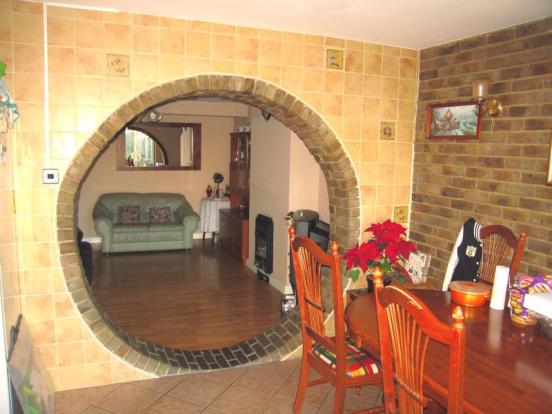
 Could this house win an award for the most unusual archway ever?
It’s really impressive!
If you’ve ever looked at an archway in a house and thought ‘that’s impressive’ … then just think it would have looked being turned into a full circle! This is such an unusual design element that it’s taken my breath away!
Stunning.
Category: General
How many photos on property details do you expect?
How many photos do you expect on estate agent details?
A record has been spotting 100 photos on one property on righmove recently.
Does it vary according to how much the property is for sale for? If a house is on sale for £50,000 then are you happy to see only 4 photos? If a property is on at £1,000,000 are you happy to see only 4 photos?
If you’re selling a house you might be trying to balance enticing people to view with preventing people being nosey. You only have a limited time to interest people in viewing your property. The more properties in your area for sale that are similar to yours then the harder you will have to try.
What are the photos like? Did you get a chance to approve them before they went live on the estate agents website? Can you ask to have them redone? A good estate agent should ensure you are happy with the photos and might even make suggestions as to minor changes to enable good photos to be taken.
Whilst decluttering is one idea, you can sometimes make photos seem better by having side lights on. A good photographer will take plenty of photos and make sure they have some good ones.
When you view a property’s details and see only a few photos, what do you think? It’s easy to assume that the rest of the property is tired and dated if you can’t see pictures of it. If bedrooms aren’t shown then you always wonder why. Likewise if a house doesn’t have its outside shown as the first picture it seems to break the unwritten convention on this. It also causes some distrust amongst house viewers. When you view a house in real life you will immediately see the outside of it, so hiding it by not adding a picture can start off the viewing on a bad note.
It also begs the question, that if the front of your house is not photogenic, then perhaps you should do something to improve it.
Grand Designs House Boat
More4 Viewers were treated last night to watching an episode different from the advertised one. In light of the house boat washing up on shore they decided to show that episode.
Grand Designs presenter Kevin McCloud called it “more of a floating Scrapheap Challenge” than a houseboat at the time.
It’s series 7 episode 3 “The Eco-Barge” – hopefully you will be able to find this soon at Ch4 4onD
Police Crime Maps available
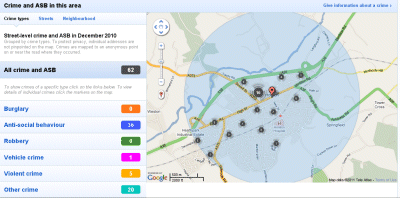 After a bleak start where the demand crashed the servers, the police crime maps are now accessible.
I think these will really change the way smart people look for a house. Whilst before you could tour an area at weekends at night to see how much activity there was, you now get an idea of how much actual anti-social behaviour there is now.
It does only show reported crime though and there is some worry that people will stop reporting crime in order to make their area look better. However I think this is self-defeating. If you have a problem with anti-social behaviour it’s often evident. From groups of youths hanging about, graffiti, to litter and broken glass. A wise house buyer will already have been pricing up car and home insurance before moving too – that way you get no surprises at all.
I think it’s a positive thing as it really shows the detail you need to allow you to be prepared for any problems. If you see one street has a high anti-social problem then when you drive down it you might realise it’s got a corner shop where kids hang out on. This might be a problem if you live near the shop but streets a bit further away will probably be fine!
I hope these maps will actually encourage people to report crime and get villains locked up. Often it’s just one person who can cause lots of problems and once they’re dealt with you get peace and quiet and a lot less crime.
When you’re buying a hosue though it will allow you to see a snap shot of crime only – but if you print out (or screen grab and save the images) on a regular basis you’ll build up a more complete picture of what crime is in an area. One bad month doesn’t mean it’s a bad area, it might have just been a one off incident causing the issues.
As with all major purchases buying a house is a huge decision and not one to be rushed into lightly. If you’re buying a house or about to put an offer in, then look at the crime maps, and the cost of insurance there. Compare where you live now and see whether it’s more or less. Perhaps keep looking and don’t rush into buying that house now, but wait a month and look at the next month’s crime data too.
Some crimes happen because of people not taking proper precautions. A house with an alarm and locked up each time you go out is less likely to be broken into. A car left on the drive with the engine running is more likely to be stolen then if you sit in the car whilst waiting for the windows to demist.
Look for areas that are in home watch schemes too – or consider starting one. Sometimes something as simple as neighbours getting together can start to make a difference to an area.
Peter Jones – Dragon – selling his house
 Peter Jones from the BBC program Dragon’s Den is selling his home.
His house was built in 2002 and is a 6 bedroom detached place in Beaconsfield.
Peter Jones House link is perfectly decluttered so there’s no personal photos about. There’s a study though where you might conjure up some fantastic business ideas!
Zoopla Property App on the iPad
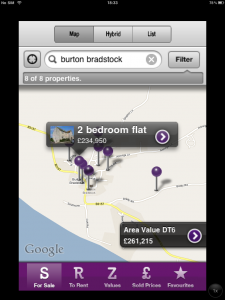 The Zoopla app is free on the iPad.
It only works in portrait mode. It does ask to use your current location when you start it up but then doesn’t always seem to use it for anything.
It’s default is the map view but there’s other options including a hybrid and a list mode. Type in your search and it takes you to a map view. It also doesn’t seem to remember the names of places you’ve typed in which makes it frustrating to have to type in names again.
The hybrid view shows satelite image with roads overlaid on it. The map view is just a road map style. The list doesn’t show any map at all but listed the properties in price order.
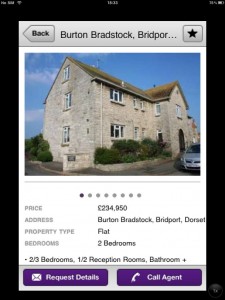 The properties are shown as purple pins stuck in a map and you click on them to see the brief detail which includes number of bedrooms and property type and price. You then click on the arrow to see more details.
From the details page you get more info, and the agent’s phone number and you can request details by email.
You can also ‘star’ the property as a favourite. THere is an option for viewing favourites at the bottom of the main screen. There’s also options for showing rentals, values and sold prices which makes it a useful app for doing more detailed price research.
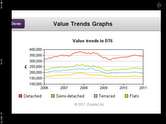 The price trends chart shows landscape and just to confuse you it turns if you rotate the pad. It’s got the sold prices for the different types of residential property in the area over the last few years. It is useful to compare to previous years and shows you the property peak prices in 08/09.
This is vaguely useful info but not as good as looking up previous sold prices for that particular property.
PrimeLocation App on the iPad
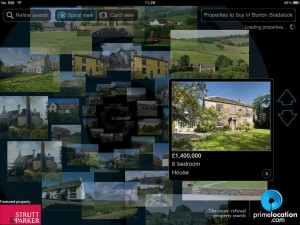 The PrimeLocation App on the iPad is easy to use.
It is free to download and use this app.
The app works in landscape mode only. The start screen has a search box for you to type in the location and to pick to buy or to rent. There are more options; this includes type of property, minimum bedrooms, maximum bedrooms, price range, search area and whether to show results in price ascending or descending.
The search has two display options – one a spiral and the other a card view. I quite like the spiral display but it’s not quite as sensible a layout to use as the card view.
You swipe the screen to change properties or click on the arrows. Whilst swiping seems to be a natural directional use for the navigation the arrows use the same directionality too. This means to see the next property you click the left arrow which to my mind is wrong… Swipe or click and view the different properties until you get to one you like. Click on the picture of the house and you’ll see the details with a link to see the full details on the primelocation site or to share the details by email.
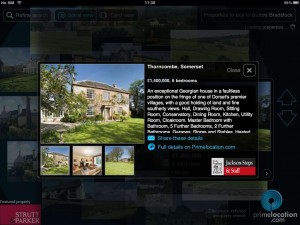 The email contains the details and a link which is quite nice if you want to keep a record of the houses you’re interested in.
When you view the property on the primelocation site you still have an option to return to the results – this is at the bottom of the screen on the left making it easy to get back to see more properties.
Press the close button to return to more properties on the search results.
The app allows you to refine your search results but doesn’t have a map feature which many other apps do. It is an interesting way of viewing properties though.
Energy Performance Certificates
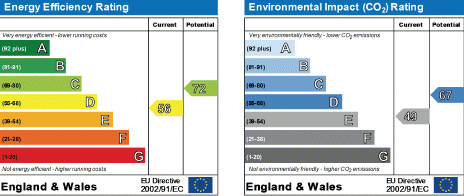 Energy Performance Certificates can be useful for working out how energy efficient a house is and how hard it is to heat them in winter. There are several opinions as to whether they accurately reflect the true nature of a house’s energy use and warmth.
You need one before you can sell your house.
The main part of the certificate that people usually look at is the rating. This is from A-G and shows the current rating and what it could be if improvement work was done.
There are many flaws within the scheme – such as low energy lightbulbs are included in the rating – but obviously someone might take them with them when they move. However low energy bulbs are frequently on offer and even available free from energy companies.
Landlords need them for rental properties too and this can be helpful if you’re looking to move to an easy to heat property and cut your energy bills. Always make sure you ask to see the EPC. Letting agents and landlords should show it you without being prompted but if they don’t, then ask.
Some propertys can not be vastly improved. Buildings without a cavity can not have cavity wall insulation. In some areas window restrictions due to the area being a conservation zone might mean the cost of appropriate double glazed windows is too expensive.
Easy things like loft insulation and draft proofing can often make a difference though. The list of recommendations can be interesting. Some EPC are often based on guesswork which can be frustrating if they have assumed no cavity wall insulation but there actually is.
You should also have within this an estimate of bills and energy use.
There’s a summary of the home’s energy performance related features such as:
walls – whether they are cavity filled.
What type of roof it is and what insulation is had.
What type of floor is it.
What the windows are
What the main heating and it’s controls are.
Whether there is secondary heating.
What the hot water system is.
What the lighting is.
It should also state if there are any low or zero carbon energy sources. That’s things like solar hotwater or photovoltaic cells, or ground heat pumps, or wood burning stoves.
An energy performance certificate is worth looking at and checking the information on it yourself or asking a surveyor to check certain aspects.
The Rightmove App
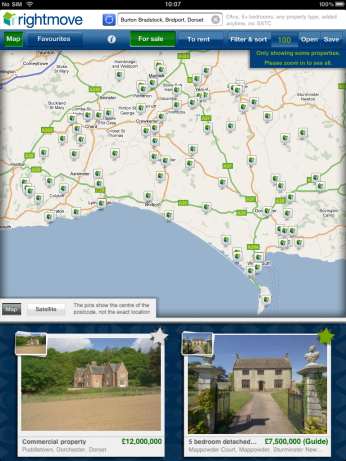 The Rightmove App on the iPad is an easy way of browsing Rightmove’s houses for sale.
Whilst you can view individual houses on the iPad from a link you can’t use the actual Rightmove website in Safari to locate houses – you have to get the app. The app is free though and is easy to use.
You can type in a postcode, town or county name just as you can on rightmove. The search filters are available to help you define price, range, number of bedrooms and whether you want to see the SSTC properties too.
You view the properties on a map which can be zoomed in or out so you can further define your area. You see the houses shown a few at a time and can scroll through this list to see them all. By zooming in you narrow your area of search and this reduces the numbers of properties shown making it easier to work out which ones you are interested in.
Clicking on a property takes you to the property detail page that has the extra photos and information as well as contact details for the agent. Some pages are better than others and links to other material don’t always work on the iPad. You can add properties to favourites though or email lnks to them to yourself or friends to share the ones you like.
Using Rightmove on the iPad is easy and you’ll find yourself browsing houses on it all the time!
Rightmove’s filters are easy to apply on this and it remembers locations you’ve browsed already in a drop down list so you can revist them easily.
Overall it’s a fun and easy app to use and will help you browse for houses!
What should be the first photo on your rightmove ad?
 What do you expect to see as the first photo on your rightmove ad?
I think it should be the outside of your house. If it’s not, then I’m always suspicious why.
When you see the kitchen first do you think automatically ‘What’s wrong with the outside?’.
This is especially true if it’s not a really amazing kitchen. If the front of the property isn’t a stunner packed with kerb appeal, then what can be done about that? Sometimes nothing – especially when it’s a flat or shared access. However it rings warning bells straight away and of course you’ll see the outside when you either click the streetview option on rightmove, or visit the place, or just have a drive past to see what it’s like.
I suppose if you can get someone interested – if they pass the 11 second rule just on the inside, then they might like it enough to ignore how ugly it is on the outside.
You should also remember perhaps that as long as the house opposite is pretty, it doesn’t matter what yours looks like as you will be inside and unable to see it!